
Models and providers
This page explains how to connect a model provider, add your own endpoint, tune the model list, and where the credentials end up.
Open Pi Settings (bottom of the sidebar) and choose Models. The first time you start pi-webapp with no model, this page opens by itself.
How providers are connected
pi-webapp shows the providers that Pi supports, which come from the Pi version it runs and change between versions (dozens at the time of writing, including Anthropic, OpenAI, Google, GitHub Copilot, OpenRouter, Mistral and xAI). Each provider connects in one or both of two ways:
| Method | You see | What happens |
|---|---|---|
| Browser sign-in | A Browser sign-in button | A provider page opens in a new tab. When you finish, the Settings dialog updates by itself. |
| API key | An API key field and Connect | The key is saved to Pi's auth.json and never sent back to the page. |
Connect a provider
- Pi Settings → Models → + Add provider (on first run the card is already open).
- Choose the provider in the Provider list.
- Click Browser sign-in, or paste the key and click Connect.
- When the card says Connected, click Return to conversation and choose a model, then pick the model in the conversation's model picker.
If a browser sign-in can't finish because the provider's callback can't reach the machine that runs Pi (a remote or containerized setup), the dialog offers Can't finish automatically? Enter an authorization code. Paste the code the provider shows you. Cancel an unfinished sign-in with Cancel.
Some providers need a non-default endpoint (a proxy or regional host). For key-based providers, expand Custom settings and fill API URL (optional) before you click Connect.
Never paste API keys or sign-in codes into the chat.
Add your own endpoint
Use a custom provider for any service that speaks one of Pi's supported protocols, including a model server on your own machine or a company gateway.
Close the Add provider card if it is open, then click + Add custom provider.
Fill in the form:
Field Meaning Example Name Display name in the picker My model serviceProvider ID A short ID, up to 64 characters my-providerAPI URL The service's base URL https://api.example.com/v1API protocol OpenAI Chat Completions, OpenAI Responses or Anthropic Messages OpenAI Chat CompletionsModel ID The model name the service expects model-nameClick Save and continue, then enter the API key the service expects and click Connect.
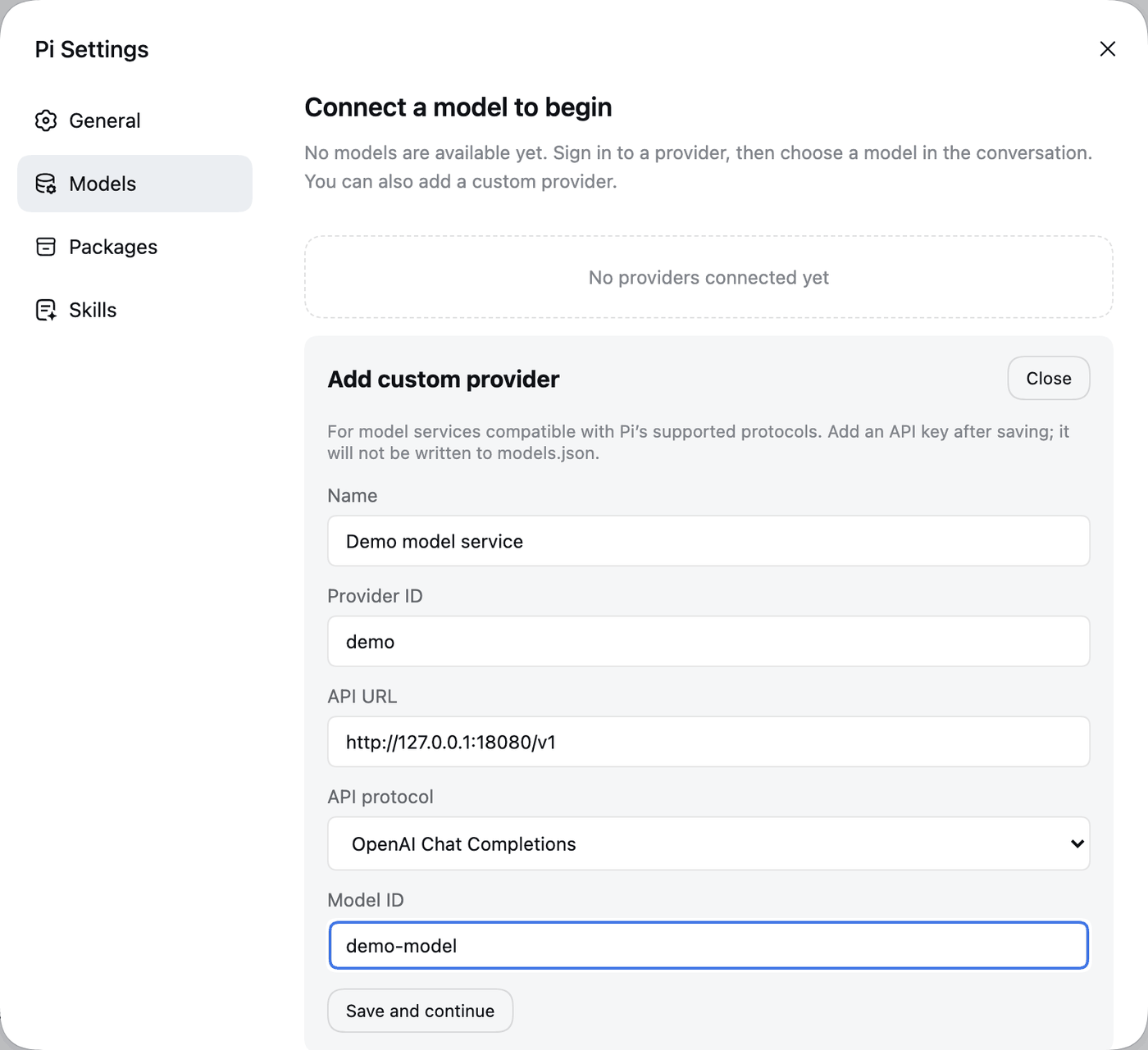
The provider entry is saved in models.json without the key. The key goes to auth.json. To add more models to the same provider, use Edit on it (below).
For a local server, use an http://127.0.0.1:<port>/v1 URL. A key is still required by the form, so any placeholder value works if your server ignores it.
Edit a provider's models
Connected providers are listed with a Configured mark. Click Edit to:
- Replace the credential: enter a new API key and click Save, or sign in again.
- Search the model catalog and select a model to change its settings: Display name, Context window, Max output tokens and Input types (Text, Image). Context and output sizes accept plain numbers or
K/Msuffixes, such as128K. - + Add model with a Model ID the provider offers.
- Restore default to discard your custom settings for one model, or Remove model to take it out of your configuration.
- Remove credentials to delete the key or sign-in that pi-webapp stored. A model may stop working afterwards.
If the Remove credentials button isn't there, the provider's authentication comes from an environment variable, from model configuration or from another source outside pi-webapp. Remove it where it is set.
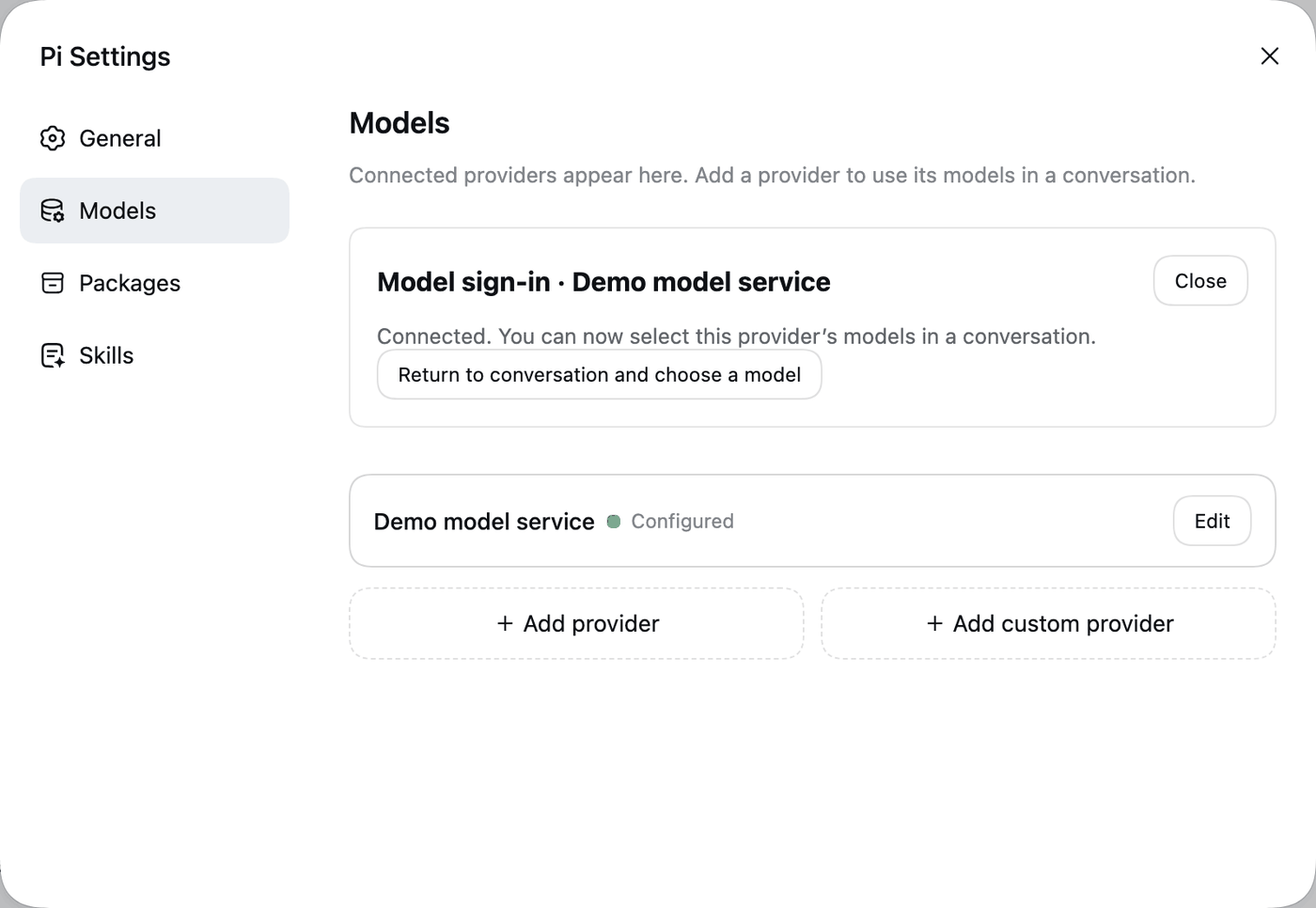
Changes to the model list are written to Pi's models.json, and the model picker refreshes afterwards.
Where things are stored
| File | Contents | Safe to share? |
|---|---|---|
~/.pi/agent/auth.json | API keys and sign-in tokens, readable by your user only | Never. |
~/.pi/agent/models.json | Custom providers and per-model settings | No keys in it, but it may reveal internal URLs. Check it first. |
Credentials are not sent back to the browser. If you changed Pi's data folder, see PI_CODING_AGENT_DIR.
Costs and data
Model usage is billed by your provider. The conversation, tool output and attachments are sent to that provider and follow its data policy. A local web page does not mean local inference, unless you point a custom provider at a model that runs on your machine.
If it doesn't work
- No models in the picker after connecting: open Pi Settings → Models and check that the provider says Configured; then reopen the model picker.
- Authentication errors in a reply: re-enter the key, or sign in again from Edit.
- More in Troubleshooting.
Next: Packages, skills and plugins.